
"The graphics have been reworked and a random function added. Great! If it were possible to add a button to mute the input during output, so that only the granular result is audible, I'd be very happy. And how about a…"
Flíva · App Store
GRFX.
A real-time granular effect. Feed it anything and it shatters the signal into clouds of grains you can reshape, repitch, reverse and scatter — then bloom into space with built-in effects.
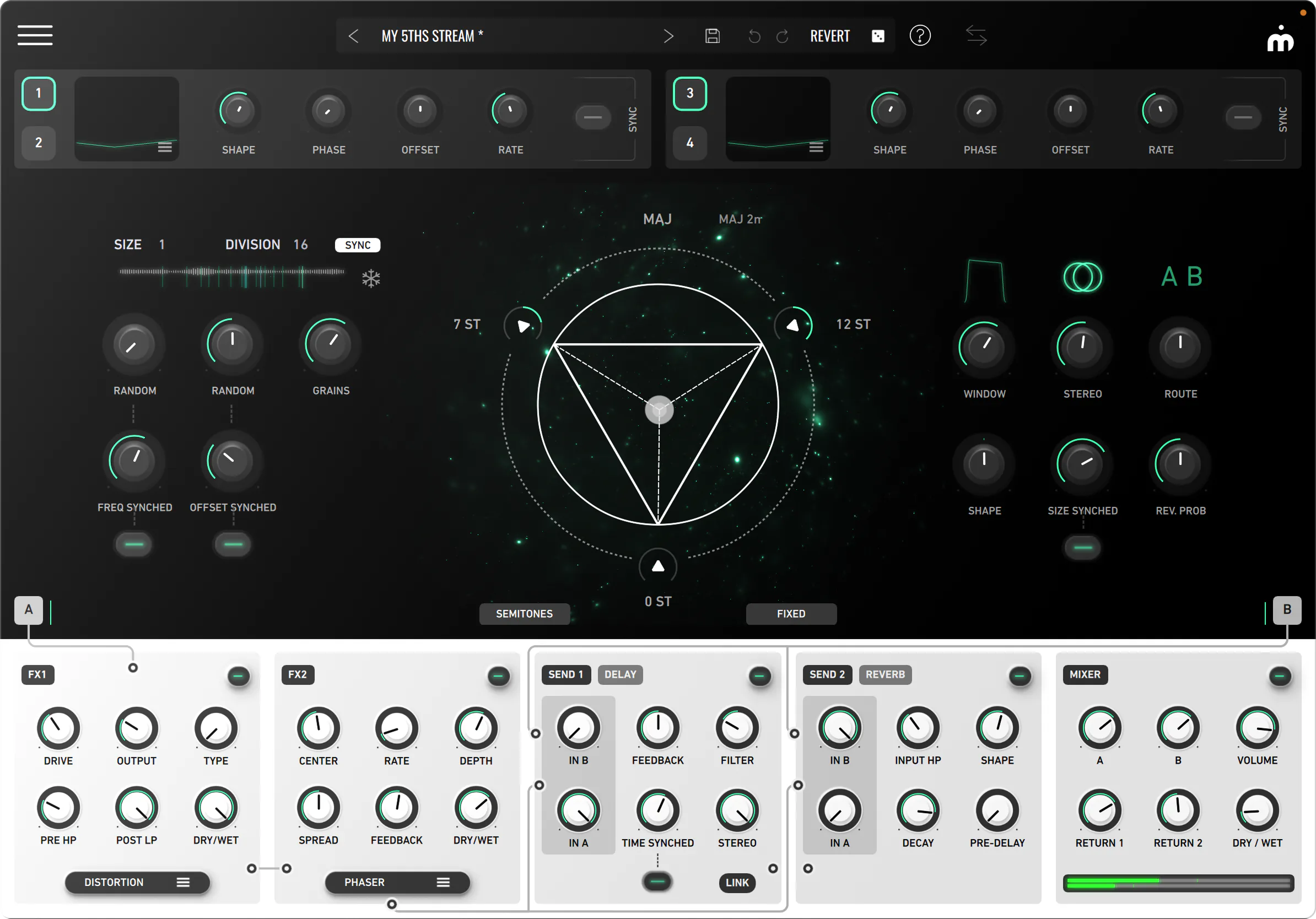
Feed GRFX any sound and it breaks it into clouds of grains you can reshape, repitch, reverse and scatter across the stereo field — from lush evolving pads to broken, glitching machines.
Blend three pitches like an instrument, set everything in motion with the LFOs, then run the result through built-in delay, reverb and two switchable effect racks. GRFX turns the audio you already have into something entirely new.
GRFX shatters any incoming signal — a synth, vocal, guitar, drum loop or full mix — into clouds of tiny grains. You put it on a sound, not play it from scratch.
Sculpt, scatter and re-pitch grains into textures, pads, rhythms and atmospheres — then bloom the result into space with built-in effects.
An interactive pitch triangle, drag-and-drop modulation, two switchable effect racks and probabilistic routing — all under one hands-on, intuitive interface.
Up to 64 simultaneous grains generated from a buffer of up to 8 seconds — or tempo-synced. Shape their size, density, position and spread, then add movement and randomness so it never sounds machine-like.
A dedicated delay — free or synced, with filtered feedback and stereo width — and a reverb with shape, decay, pre-delay and input high-pass. Two independent sends, no extra plugins.
Freeze the incoming audio and keep granulating the frozen instant — perfect for live performance and infinite, evolving textures. Add reverse-grain probability for glitch and stutter.
Two switchable effect slots — Filter, Distortion, Delay, 2× Peak EQ, Chorus, Phaser, Bitcrusher and Reverb — chained or parallel. Probability-based routing decides which grains travel which chain, no automation required.
Four self-modulating LFOs with six waveforms — sine, square, saw, triangle, sample & hold and filtered S&H, free or tempo-synced. Drag a waveform onto almost any knob to make it breathe. Cross-modulate one LFO with another.
Feed the output back into the buffer to build blooming, self-evolving washes. Tempo-sync everywhere: grain size, frequency, offset, delay time and LFO rate all lock to your project.
A unique, hands-on way to mix three pitches. Each vertex holds a quantized or continuous −12 / +12 pitch; the handle weights them by distance. It's the fastest way to turn a single tone into a harmony.
GRFX assigns modulation by drag-and-drop — no modulation matrix required. Drag a modulator's waveform onto the parameter you want to move, then set the amount directly on the parameter itself.
With four LFOs and almost every visible parameter open to modulation, you won't run out of options. You can even cross-modulate between LFOs by dragging one unit's waveform onto another — and a dedicated modulation panel gives you a global view to edit or remove every assignment.
GRFX runs two chained multi-effect units — Filter, Distortion, Delay, two Peak EQs, Chorus, Phaser, Bitcrusher and Reverb — so you can sculpt every grain before it ever reaches the mix.
Alongside them, dedicated Delay and Reverb work in send/return mode, chained or in parallel, giving you flexible signal routing and full control over the sonic space of every signal route.
GRFX turns simple sounds into textures, glitches, ambiences, drones and peculiar effects. Listen for yourself.
Best on headphones, or anything that reproduces stereo honestly.
Just when you think you’ve had enough granular effects, Imaginando’s GRFX does everything right.
The plugin features a sleek black-and-white design with turquoise textures. At its core is a nebula-like visual, referred to by Imaginando as the Harmonic Triangle. It looks both stunning and…
Imaginando’s GRFX proves to be a sophisticated tool for modern sound design, allowing you as a granular sound designer to create many creative sounds and soundscapes.

We're massive fans of granular effects, and GRFX has quickly become one of our favorites. The Harmonic Triangle and cross-modulating LFOs are great unique features that make it stand out.
Learning is in our ethos. Verified students and educators get 50% off GRFX — same features and updates. Verify your status, get the code, install.
GRFX runs on iPhone and iPad as an AUv3 plugin and Standalone app — a separate paid App Store purchase.

VST3, VST & AU plugin formats. Apple Silicon native. ~230 MB download.
64-bit VST / VST3 host. ~44 MB download.
iPhone & iPad. AUv3 plugin & Standalone. ~117 MB download.
Every parameter, every routing option, every modulation slot. Searchable, with diagrams and signal-flow walkthroughs.
Read the manual →Video tutorialsShort videos covering the Harmonic Triangle, modulation, the FX rack and a few sound-design recipes from our team.
Open YouTube →SupportStuck on a license, a mapping or a project file? Send us a message — we usually answer the same day, in English or Portuguese.
Open chat →