

FRMS.
Any sound. Endlessly reshaped.
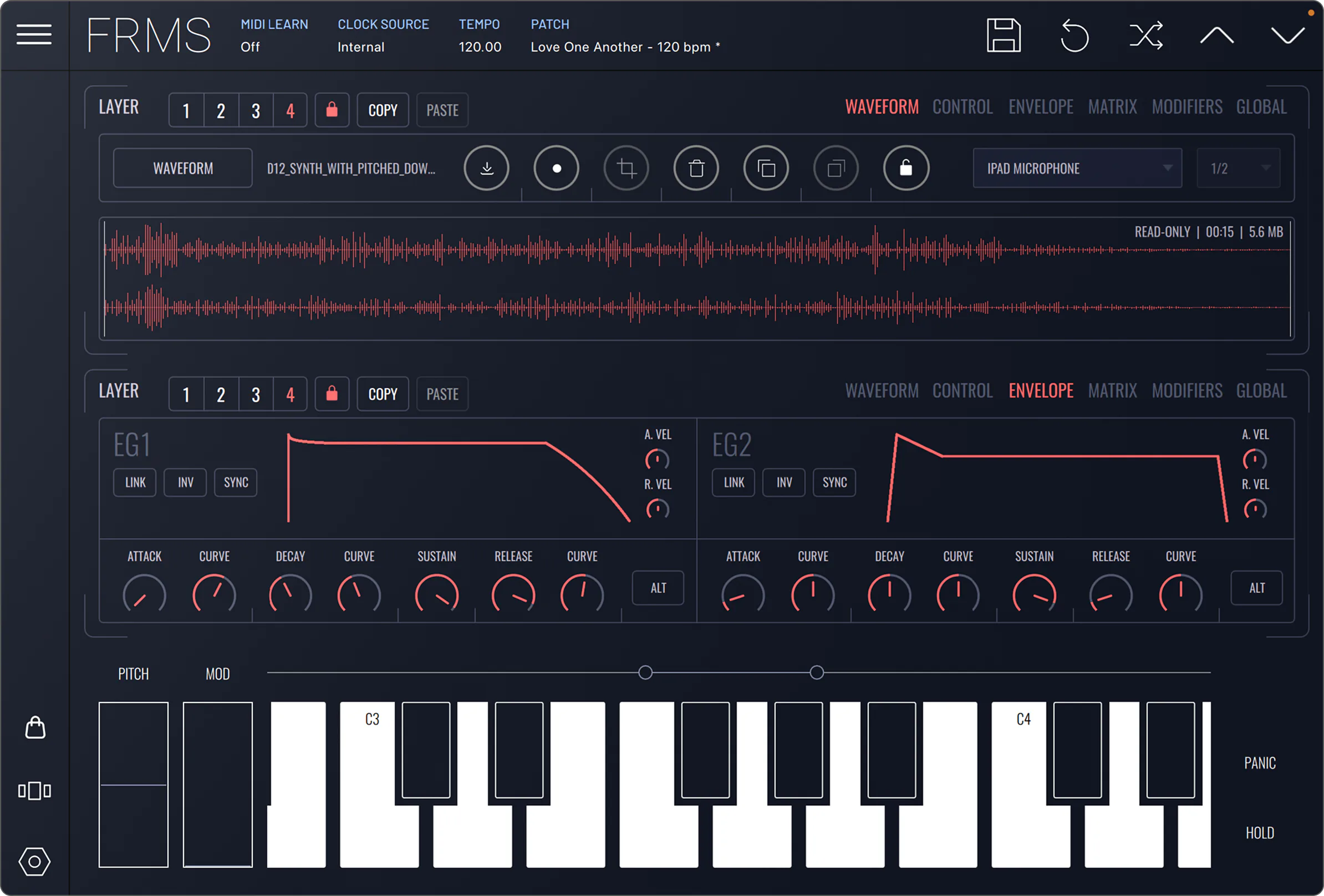
A granular synthesizer that turns any sample into a playable instrument. Drop a vocal, a field recording, a chord — break it into grains and find textures that didn't exist a minute ago.

The short version.
FRMS slices any sample into clouds of grains — stretched, scattered and re-pitched into living, evolving textures you can play like an instrument.
A granular synthesizer for desktop, iOS and Android. Up to four layers per patch, each with its own engine, filter and envelopes — plus a modulation matrix and effects that take a raw sample to a finished patch without leaving the plugin.
Any sample, made playable.
Drop a vocal, a field recording, a chord. FRMS breaks it into up to 80 grains per voice and spreads it across the keyboard as an instrument.
Textures that never sit still.
Position, density, spray, pitch and jitter sculpt the grain cloud, while envelopes and the modulation matrix keep it evolving as you play.
Deep engine, fast results.
163 factory presets and eighteen expansion packs get you to a finished sound in minutes — and the engine rewards going deeper.
FRMS, in motion.
The pieces that make grains sing.
Up to 80 grains per voice
Fill the air. Stack dozens of grains for shimmering clouds, or thin out to a single tone — density is just a knob away.
Position scrub & freeze
Move freely through any sample. Lock the playhead, spray grains around it, freeze a single moment in time and stretch it forever.
Spray, pitch, jitter
Three knobs that turn any sample into something else. Detune grains, scatter their start points, randomise their length.
Per-grain envelope
Shape each grain with a configurable Hann window. The difference between musical and broken is one curve.
Three steps from sample to instrument.
Drop a sample.
Drag any audio file onto FRMS — a vocal, a field recording, a chord stab. The waveform appears, transients marked, ready to play.
Break it into grains.
Set position, density and pitch. Spray grains across the sample, freeze a single moment, scatter them in stereo. Listen as it transforms.
Play it like an instrument.
Map a controller, route to your DAW, layer with FX. The sample is now a synth — every key a new texture, every note alive.
The features that stand out.
Hear the presets.
Pads, drones and granular textures.
A curated set of FRMS preset demos — pads, drones, vocal granulation, field-recorded percussion.
Best on headphones, or anything that reproduces stereo correctly.
From sample to cloud, in three lessons.
From sample to pad in five minutes
Grain density and spray — sculpting the cloud
Spectral freeze and time stretching, deep dive
What the press says.
On a mission to innovate rather than imitate, Imaginando has built a solid reputation for releasing products that excite musicians and producers, offering new ways to maximize creativity.
FRMS is a versatile synth that combines granular synthesis with FM synthesis. Imaginando is a Portuguese plugin developer that creates some cool effects and virtual instruments.
By the time we reached the 20th century and the advent of the electronic age, sound creation had been elevated into a science in its own right.
Own it your way.
Pay monthly
- Flexible monthly payments
- Pause or cancel anytime
- Same licence as buying once
- Yours to keep after the final payment
Pay one-time
- One-time payment, no subscription
- 14-day refund guarantee
- 163 factory presets
- AU · VST · VST3
Get the full bundle
- Best value — save vs buying separately
- Desktop licences only
- FRMS + all expansion packs
Students & teachers, 50% off.
Verified students and educators get 50% off FRMS — same features and updates. Verify your status, get the code, install.
Will it run on your rig?
macOS 12 or higher
AU, VST, VST3. Apple Silicon native. ~772 MB download.
Windows 10 or higher
64-bit. VST, VST3. ASIO recommended · ~211 MB download
iOS 17.0 or higher
Universal iPhone & iPad. AUv3 host & plugin · ~268 MB download
Android
Standalone app. ARM64. Low-latency Oboe audio.
Quick answers.
What is FRMS?
+
Which platforms and formats does FRMS support?
+
Can I use my own samples?
+
Is the mobile version included with the desktop app?
+
What's included, and can I expand it?
+
Can I try FRMS before buying?
+
Stuck? We got you.
FRMS full documentation
Every parameter, every routing option, every modulator. Searchable, with diagrams and signal-flow walkthroughs.
Read the manual →Video tutorialsWatch the walkthroughs
Step-by-step videos covering sources, density, modulation, spectral mode and sound-design recipes from our team.
Open YouTube →SupportTalk to Imaginando
Stuck on a licence or a patch? Send us a message — we answer fast, usually the same day, in English or Portuguese.
Open chat →